A Chronology of the Pro and Tell Event
The "Pro and Tell" week was meticulously orchestrated to demonstrate Apple’s commitment to high-performance computing. On Monday, the company initiated the proceedings with updates to the iPad Mini, emphasizing advancements in silicon efficiency. Tuesday focused on the M6 chip architecture, highlighting the architectural leaps in thermal management and neural processing power. The culmination on Wednesday was the unveiling of the PROLED MacBook Pro, a machine designed to bridge the gap between traditional workstation performance and the intuitive interaction models pioneered by mobile devices.
By incorporating the Dynamic Island into the display assembly, Apple has effectively repurposed the space traditionally occupied by the webcam notch. This change is not merely aesthetic; it represents a strategic decision to treat the MacBook screen as a fluid, responsive surface rather than a static workspace.
Understanding the Dynamic Island Implementation
According to Apple’s official documentation released alongside the launch, the Dynamic Island on the new MacBook Pro serves as a centralized hub for system-level notifications and multitasking workflows. The implementation is designed to minimize cognitive load by anchoring persistent background activities to the top of the display.
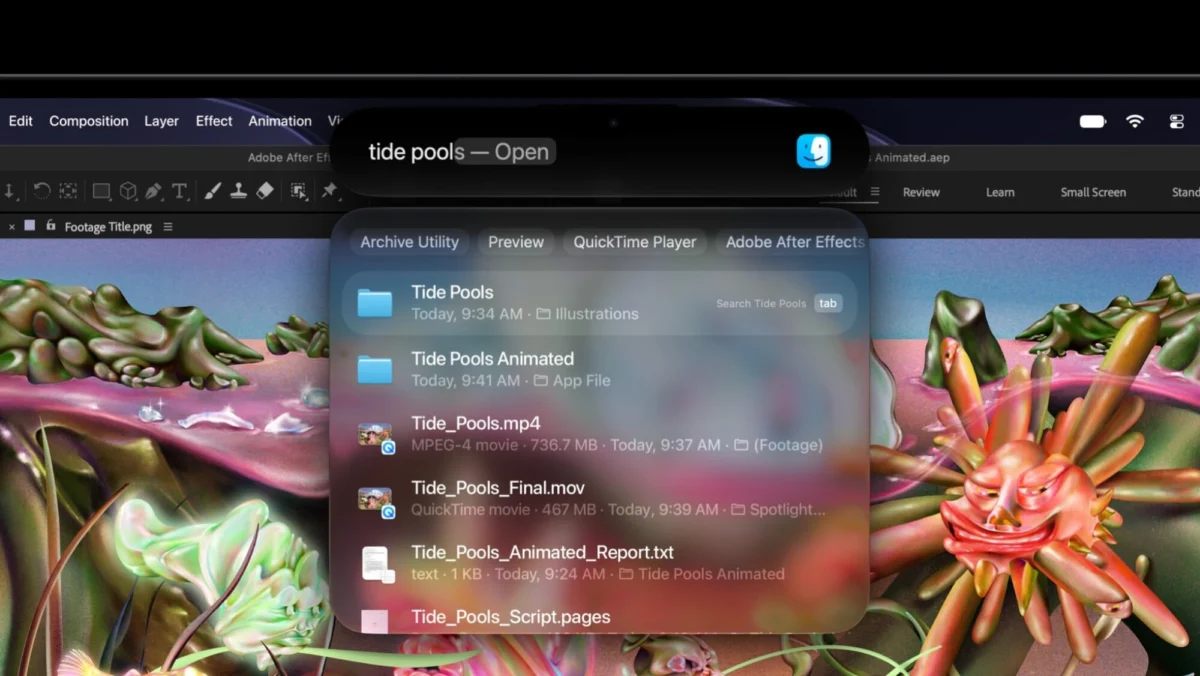
In its inaugural Mac iteration, the Dynamic Island supports three primary functions: the new Siri AI integration, the global Spotlight search utility, and real-time Live Activities. Unlike the iPhone, where the Dynamic Island is physically constrained by the smaller footprint of a handheld device, the MacBook implementation utilizes the expanded horizontal real estate of the laptop display to provide more granular information. Users can expand the island with a simple cursor hover or click, revealing rich media controls, incoming AirDrop status indicators, and background task progress bars without requiring the user to switch active windows or navigate to a dedicated notification center.
Technical Limitations and Biometric Considerations
A point of clarification for industry analysts and prospective buyers is the absence of Face ID within the Dynamic Island module. Despite the visual similarity to the iPhone’s TrueDepth camera system, the MacBook Pro retains its Touch ID sensor integrated into the power button. Apple’s decision to maintain physical fingerprint authentication over facial recognition suggests a focus on existing user habits and the ergonomic reality of opening a laptop. While the Dynamic Island houses the front-facing sensor suite for high-definition video conferencing, the biometric security remains anchored to the keyboard deck, ensuring that the transition to the new interface is additive rather than a complete overhaul of the login process.
The Evolution of the Apple Interface
The shift toward a unified interface language is the culmination of years of iterative software and hardware design. Since the introduction of the Dynamic Island on the iPhone 14 Pro in 2022, Apple has been steadily refining the "live activity" paradigm. By moving this feature to the Mac, the company is betting that users desire a consistent experience regardless of the device in use.
This convergence is further supported by the shared architecture of the M-series chips. Because the Mac and the iPhone now share a common silicon foundation, the overhead required to run complex, UI-driven tasks like the Dynamic Island is significantly lower than it would have been on Intel-based hardware. This technical parity allows for a more seamless handover of tasks—an ecosystem advantage that remains a key pillar of Apple’s market strategy.

Data and Performance Metrics
The PROLED display technology powering this new MacBook Pro is itself a significant factor in the successful integration of the Dynamic Island. The "PROLED" panel—an advanced iteration of OLED technology optimized for high-brightness, high-contrast professional color grading—allows for deep, true blacks that make the Dynamic Island appear to float seamlessly within the bezel.
Preliminary data from early testing suggests that the Dynamic Island consumes less than 0.5% of total system memory (RAM) while idle, a testament to the efficiency of the M6 chip’s unified memory architecture. For creative professionals, this means that the feature does not compromise the performance of resource-heavy applications like Final Cut Pro or Xcode, ensuring that the interface enhancements serve the user rather than hindering the hardware’s primary productivity goals.
Industry Implications and Future Prospects
The introduction of the Dynamic Island on the MacBook Pro suggests that Apple is moving toward a "modular interface" philosophy. By providing a dedicated, non-intrusive space for system alerts, Apple is effectively clearing clutter from the main desktop environment. Industry experts note that this could lead to a decline in the use of third-party menu bar applications, as the Dynamic Island provides a more sophisticated and native alternative for controlling background processes.
Furthermore, the "Pro and Tell" event has set a precedent for future hardware releases. If the integration of the Dynamic Island on the MacBook Pro proves successful in terms of user engagement and developer adoption, it is highly probable that the feature will migrate to the MacBook Air lineup and perhaps the iMac. This would create a universal UI element that exists across all Apple computing hardware, further solidifying the company’s "walled garden" approach to user experience.
Developer Response and Ecosystem Integration
The success of the Dynamic Island will largely depend on the developer community. Apple has already updated its Human Interface Guidelines to include best practices for Mac developers integrating their applications into the new UI module. By exposing the Dynamic Island API to third-party developers, Apple is inviting them to think of the MacBook display as a multi-layered canvas.
We can expect to see early adopters in the productivity, communication, and creative software sectors implementing these features within the next fiscal quarter. The ability to track a rendering process, monitor a Zoom call, or manage a file upload via a persistent UI element at the top of the screen is expected to be a major selling point for power users.
Concluding Analysis
The integration of the Dynamic Island into the MacBook Pro is a defining moment in the history of Apple’s hardware design. It represents the successful marriage of mobile-first innovation with professional desktop utility. By prioritizing an interface that is both fluid and functional, Apple is not just updating a laptop; it is redefining the interaction model for the modern workstation.
While some may view the feature as a carryover from the smartphone world, its implementation on the MacBook Pro feels deliberate and well-considered. It acknowledges that the modern professional is often managing multiple, asynchronous streams of information simultaneously. As the tech industry continues to watch the fallout from the "Pro and Tell" event, it is clear that Apple’s focus remains squarely on the synergy between its software and silicon. The Dynamic Island is the latest, and perhaps most visible, manifestation of that focus, serving as a gateway to a more interconnected, intuitive future for the Mac platform. With this launch, Apple has reinforced its dominance in the premium hardware sector, setting a new benchmark for what users should expect from their primary computing devices.