
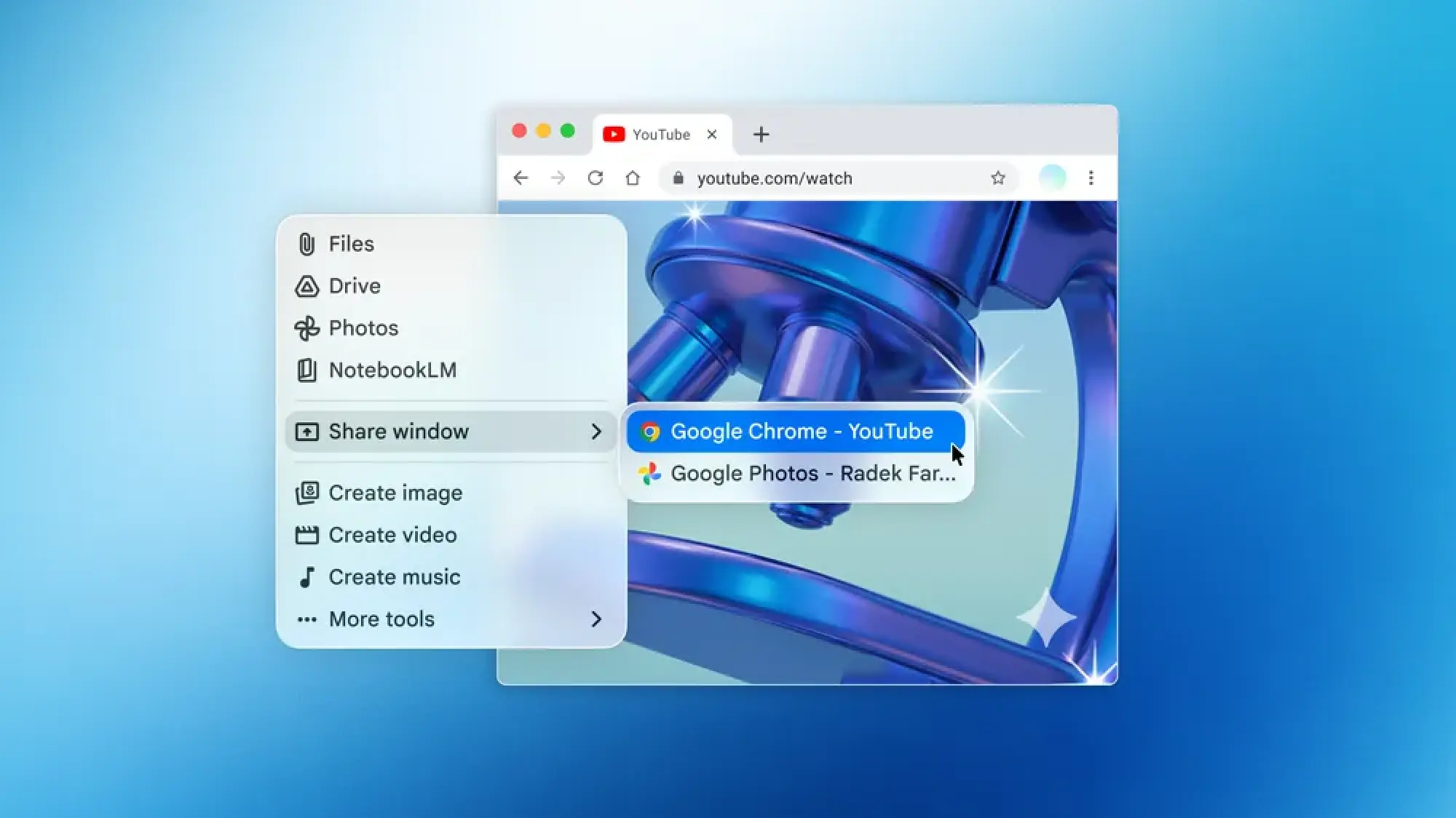
Mac users seeking to integrate advanced artificial intelligence capabilities directly into their workflow now have a new powerful tool at their disposal: Google’s Gemini AI assistant has officially launched as a dedicated application for macOS. This move by Google signifies a critical step in the ongoing evolution of AI, pushing it beyond web browsers and mobile devices to become a more pervasive and deeply integrated component of desktop computing. The introduction of a native Mac application for Gemini is not merely a convenience; it represents Google’s strategic intent to establish its AI as an indispensable, proactive, and personalized assistant at the heart of the user’s digital experience, directly competing in a rapidly expanding market that is seeing major tech players vie for desktop AI dominance.
The Dawn of Desktop AI: Gemini’s Strategic Entry
Google’s Gemini, initially launched as a multimodal generative AI model and subsequently rebranded from Bard, is now readily accessible to macOS users through a standalone application. This development, confirmed by Google, allows for a more seamless and integrated interaction with the AI, moving beyond the traditional web-based interface. The application’s core functionality is immediately accessible via a convenient keyboard shortcut, Option + Space, designed to make summoning the AI assistant as natural and fluid as using Spotlight Search or other system-level commands. This direct access mechanism underscores Google’s commitment to embedding Gemini into the fundamental operating rhythm of macOS users.
Beyond mere accessibility, the dedicated Mac app introduces enhanced capabilities that leverage the native environment of the operating system. Users can now share the content displayed on their screen directly with Gemini, enabling the AI to analyze, summarize, or interact with visual information in real-time. Furthermore, the application is equipped to access local files, opening up a new realm of possibilities for document analysis, content creation, and personalized assistance that directly interacts with a user’s private data stored on their machine. These features, while powerful, necessitate explicit user consent through macOS’s privacy settings, allowing Gemini access to screen recording and audio input. Google advises users to manage these permissions judiciously, revoking access when not actively utilizing these features to safeguard privacy and security.
A Chronology of AI on the Desktop: The Race to Integrate
The journey of artificial intelligence from niche research to ubiquitous consumer technology has been marked by several significant milestones. While early forms of AI assistants like Apple’s Siri, Microsoft’s Cortana, and Amazon’s Alexa primarily focused on voice commands and basic task automation, the advent of generative AI models in recent years has dramatically shifted the landscape.
- Late 2022 – Early 2023: OpenAI’s ChatGPT exploded into public consciousness, showcasing unprecedented capabilities in natural language understanding and generation. This sparked a furious race among tech giants to develop and deploy their own large language models (LLMs).
- February 2023: Google introduced Bard, its conversational AI experiment, as a direct response to ChatGPT. Bard was initially built on Google’s LaMDA model.
- December 2023: Google unveiled Gemini, its most ambitious and capable AI model to date, designed from the ground up to be multimodal (capable of understanding and operating across text, images, audio, and video). This marked a significant strategic pivot for Google’s AI efforts.
- Early 2024: OpenAI began testing and subsequently rolled out a dedicated ChatGPT desktop application for macOS users. This app offered features like a keyboard shortcut for quick access, voice interaction, and the ability to interact with screen content, setting a new benchmark for desktop AI integration.
- Mid-2024: Anthropic, another leading AI research company, followed suit by making its advanced AI model, Claude, available as a desktop application for Mac, emphasizing its long context window and safety-focused approach.
- June 2024: Google officially launched the Gemini dedicated app for macOS, completing its entry into the native desktop AI market. This launch, while following competitors, aims to differentiate through Google’s vast ecosystem integration and multimodal capabilities. Concurrently, Apple announced "Apple Intelligence" at WWDC, signaling its own deep dive into on-device and cloud-powered AI for macOS Sequoia, iOS 18, and iPadOS 18, further intensifying the competition for the user’s AI attention on their personal devices.
This timeline illustrates a clear trend: AI is no longer confined to web browsers or smartphone apps but is rapidly becoming a fundamental layer of the desktop operating system itself, striving for deeper integration and more intuitive interaction.
Unpacking Gemini’s Key Features for Mac Users
The Gemini Mac application brings several functionalities that promise to enhance productivity and redefine user interaction with their computers.
1. Instant Access via Keyboard Shortcut (Option + Space):
The chosen keyboard shortcut is a deliberate design decision aimed at minimizing friction. By mapping Gemini to Option + Space, Google places its AI assistant alongside macOS’s native Spotlight Search (Command + Space), signaling its intent for Gemini to be a primary tool for quick information retrieval, task initiation, and creative assistance. This direct access method is significantly more efficient than opening a web browser and navigating to the Gemini website, fostering a more continuous and less interruptive workflow. Users can quickly pose questions, request summaries, generate content, or initiate complex tasks without ever leaving their current application.
2. Screen and Audio Contextual Awareness:
This is arguably one of Gemini’s most compelling features on the Mac. By granting the app permission to access the Mac’s screen and audio, users unlock a new dimension of contextual interaction.

- Screen Content Analysis: Imagine working on a complex spreadsheet and asking Gemini to analyze specific data points visible on your screen, identify trends, or even generate a summary. Or, perhaps, a designer could ask Gemini for feedback on a visual mock-up, or a developer could have it debug a piece of code shown in their IDE. This capability transforms Gemini from a generic chatbot into a highly relevant assistant that understands the user’s immediate visual context. It can summarize articles open in a browser, extract key information from a presentation, or even explain elements within an image.
- Audio Interaction: With audio access, Gemini can potentially transcribe meetings, analyze spoken language for sentiment, or provide real-time assistance based on verbal queries without requiring text input. This moves towards a more natural, conversational interface, particularly useful for accessibility or hands-free operation.
However, the power of these features is intrinsically linked to privacy considerations. Google’s explicit advice to revoke access when not in use highlights the sensitivity of sharing screen and audio data. Users must weigh the convenience and utility against potential privacy implications, understanding what data is being shared and how it is processed.
3. Local File Integration:
The ability for Gemini to "look at your local files" represents a significant leap in desktop AI functionality. While specific details on the scope of file access (e.g., whether it’s limited to user-selected files or broader directories) are crucial for user understanding, the potential applications are vast:
- Document Summarization and Analysis: Users could ask Gemini to summarize lengthy PDF reports, analyze data in spreadsheets, or extract key points from local text documents.
- Content Generation based on Local Data: Drafting emails, reports, or creative content that draws directly from information stored on the user’s Mac, ensuring consistency and relevance.
- Information Retrieval: Quickly finding specific information within a large repository of local files without manual searching.
This feature moves Gemini towards becoming a personal knowledge manager and content assistant deeply integrated with the user’s digital assets. It also raises critical questions about data handling, local processing vs. cloud processing of private data, and Google’s commitment to user data privacy on locally stored files.
Privacy and Security: A Double-Edged Sword of Integration
The enhanced integration of Gemini into the macOS environment, particularly its access to screen content and local files, brings significant benefits but also underscores paramount privacy and security concerns. Google’s recommendation to "revoke that access when you’re not using the feature" is a stark reminder of the sensitive nature of the data being exposed.
- Data Transmission: When Gemini analyzes screen content or local files, it’s crucial for users to understand if this data is processed entirely on-device (on-edge AI) or transmitted to Google’s cloud servers. Generally, advanced generative AI models require significant computational power, often implying cloud processing. If data is sent to the cloud, questions arise about encryption, anonymization, and Google’s data retention policies for this highly personal information.
- User Consent and Control: macOS has robust privacy controls for screen recording, microphone access, and file system permissions. Gemini’s integration relies heavily on these user-granted permissions. Educating users on exactly what these permissions enable and the implications of granting them is vital. Users need granular control over what specific files or applications Gemini can interact with, rather than a blanket access.
- Google’s Privacy Policy: Users should familiarize themselves with Google’s updated privacy policy regarding Gemini, especially concerning data used for model training and personalization when interacting with desktop features. Transparency regarding data usage, storage, and deletion is critical for building user trust.
- Security Vulnerabilities: Any application with deep system access could theoretically become a vector for security exploits if not impeccably secured. Google, with its extensive security expertise, is expected to implement robust safeguards, but the inherent risks of granting an external application such broad access remain a consideration for users and IT administrators.
The balance between powerful AI assistance and unwavering privacy protection will be a defining challenge for Google and other AI providers as desktop integration deepens.
The Competitive Landscape: Google’s Position in the AI Arena
Google’s entry into the dedicated Mac app space for Gemini means it joins an increasingly crowded and competitive field. Both OpenAI’s ChatGPT and Anthropic’s Claude have already established a presence on macOS.
- OpenAI’s ChatGPT Mac App: Launched earlier, ChatGPT’s app offers similar features, including a quick keyboard shortcut, voice interaction, and the ability to discuss screen content. OpenAI has been aggressive in integrating its models into various platforms, and its first-mover advantage on macOS has allowed it to capture early adopters. The key differentiator often lies in the underlying model’s capabilities (GPT-4o), its ecosystem (plugins, custom GPTs), and its public perception.
- Anthropic’s Claude Mac App: Claude is known for its strong emphasis on safety, ethical AI, and exceptionally long context windows, making it suitable for processing extensive documents and complex conversations. Its Mac app also aims for seamless integration, targeting users who prioritize detailed analysis and responsible AI.
- Microsoft Copilot: While primarily integrated into Windows and Microsoft 365 services, Microsoft’s Copilot represents another formidable competitor, leveraging the vast Microsoft ecosystem and its own powerful models. Its deep integration into Windows is a significant advantage for that platform’s users.
- Apple Intelligence: Perhaps the most significant upcoming competitor is Apple’s own "Apple Intelligence," slated for release with macOS Sequoia. Apple’s strategy focuses on deep on-device integration, privacy-preserving cloud processing (Private Cloud Compute), and a highly personalized experience across its ecosystem. This native solution could set a new standard for desktop AI, potentially offering a level of integration and performance that third-party apps might struggle to match. Apple Intelligence will also integrate with third-party AI models like ChatGPT when users opt-in, indicating a hybrid approach.
Google’s challenge is to differentiate Gemini through its multimodal prowess, its integration with Google’s vast array of services (Gmail, Docs, Calendar, Search), and its promise of a "truly personal, proactive and powerful desktop assistant." The company’s statement, "this launch is ‘just the beginning.’ We’re building the foundation for a truly personal, proactive and powerful desktop assistant, with more news to share in the coming months," hints at further advancements, potentially including deeper system hooks, more proactive assistance (e.g., anticipating user needs based on calendar or email), and even more sophisticated multimodal understanding.
Broader Impact and Implications for the Future of Computing
The arrival of Gemini on macOS, alongside its competitors, signals a pivotal shift in how we interact with personal computers.
- Elevated Productivity: The immediate benefit is a significant boost in productivity. AI assistants can now perform tasks that previously required manual effort or extensive searching, from summarizing documents to generating creative content, directly within the user’s workspace. This could free up valuable time for more complex, strategic, and creative endeavors.
- Redefining User Interface: The keyboard shortcut access and contextual awareness mark a move towards a more "agentic" interface, where the AI proactively assists rather than passively waits for commands. This could evolve into a future where the AI anticipates needs, suggests actions, and even automates multi-step workflows across applications.
- Intensifying Ecosystem Wars: The battle for AI dominance on the desktop will profoundly shape the future of computing platforms. Google, OpenAI, Anthropic, Microsoft, and Apple are all vying to become the default AI layer, influencing user choice and potentially locking users into specific ecosystems. The winner of this race may dictate how users interact with technology for the next decade.
- Ethical and Regulatory Challenges: As AI becomes more integrated and powerful, ethical considerations around data privacy, algorithmic bias, and the potential for misuse will become even more pressing. Regulators globally are grappling with how to govern AI, and desktop integration will add another layer of complexity to these discussions.
- Accessibility and Personalization: On the positive side, deeply integrated AI can significantly enhance accessibility for users with disabilities, offering new ways to interact with computers. Furthermore, the promise of a "truly personal" assistant suggests a future where AI adapts profoundly to individual user habits, preferences, and needs, offering hyper-customized experiences.
Google’s Gemini app for Mac requires macOS version 15 (macOS Sequoia) and higher, ensuring compatibility with the latest operating system advancements that are also paving the way for Apple’s own AI initiatives. The application is freely available for download directly from gemini.google/mac, making it accessible to a broad base of macOS users eager to explore the next frontier of desktop computing. As the lines between operating systems, applications, and AI blur, Google’s move represents a bold step towards a future where intelligent assistants are not just add-ons, but fundamental co-pilots for our digital lives.










Leave a Reply