
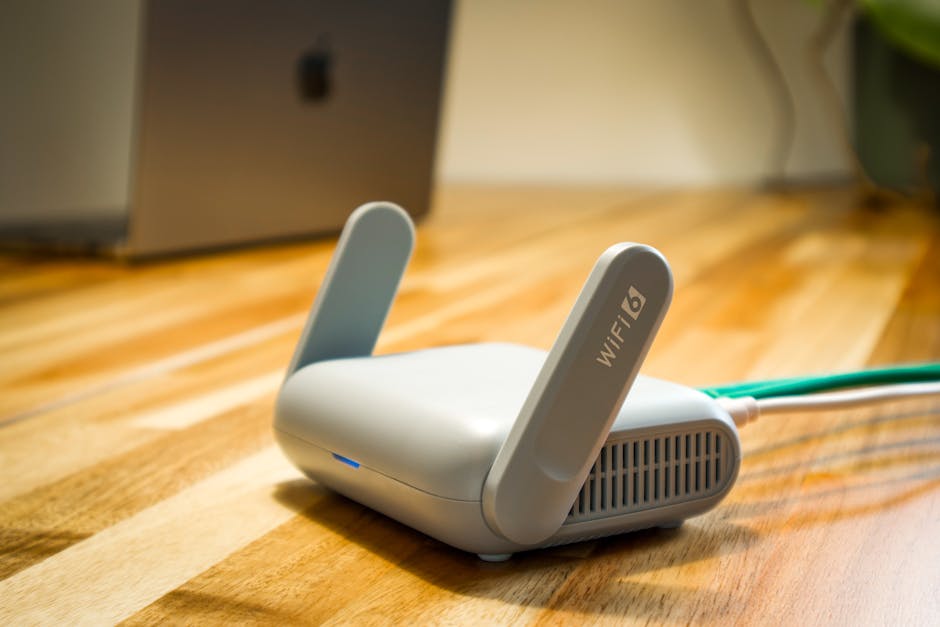
Understanding Your Router: The Brains of Your Home Network
Your router is the unsung hero of your digital life. It’s the device that connects all your internet-enabled gadgets – from smartphones and laptops to smart TVs and gaming consoles – to the internet. Without a router, your home would be a collection of disconnected devices, unable to share information or access the vast resources of the World Wide Web. This article will delve deep into the inner workings of your router, exploring its fundamental functions, the various components it comprises, how it establishes and maintains your internet connection, the role it plays in network security, and the common issues that can arise, along with their troubleshooting. We will also touch upon the evolution of router technology and its future implications, providing a comprehensive understanding of this essential piece of hardware.
At its core, a router’s primary function is to direct internet traffic. Think of it as a traffic cop for your data. When you request information from a website, send an email, or stream a video, your device sends that request to the router. The router then examines the destination of that data packet and forwards it along the most efficient path towards its target on the internet. Conversely, when data returns from the internet, it arrives at your router, which then determines which specific device on your home network is supposed to receive it and sends it accordingly. This process, known as packet routing, is the fundamental mechanism by which all internet communication operates. Routers achieve this by maintaining routing tables, which are essentially maps of interconnected networks. These tables help the router decide the best "next hop" for each data packet to take to reach its destination.
The physical components of a router are designed to facilitate this complex data management. Most modern routers feature a central processing unit (CPU) that handles the processing of network traffic and executes firmware instructions. They also contain Random Access Memory (RAM), which is used for temporary storage of data and routing information, and flash memory, which stores the router’s firmware – the operating system that controls its functionality. On the exterior, you’ll find various ports. The Wide Area Network (WAN) port, often labeled "Internet," is where your modem connects, bridging your home network to the outside world. The Local Area Network (LAN) ports, typically numbered 1 through 4 or more, are for wired connections to devices like desktop computers or network-attached storage (NAS) devices. Wireless routers also incorporate antennas, either internal or external, to broadcast Wi-Fi signals, enabling wireless connectivity for your devices.
Establishing and maintaining your internet connection involves a series of crucial steps. When you power on your router and modem, they initiate a handshake process. The modem, which translates the digital signals from your internet service provider (ISP) into a format your router can understand, establishes a connection with your ISP’s network. This often involves protocols like PPPoE (Point-to-Point Protocol over Ethernet) or DHCP (Dynamic Host Configuration Protocol) to obtain an IP address from your ISP. Once the modem has a valid IP address and a connection to the internet, it passes this connection to the router via the WAN port. The router then acts as a gateway, creating your private home network. It assigns unique local IP addresses to each device connected to it, allowing them to communicate with each other and with the router. This process is also managed by DHCP, with the router acting as a DHCP server for your local network.
Beyond its routing duties, your router is a critical line of defense for your home network. Security features are built into the firmware to protect your devices from unauthorized access and malicious threats. Network Address Translation (NAT) is a fundamental security feature that masks the IP addresses of your internal devices, making them invisible to the outside internet. This means that external hackers can’t directly target individual devices on your network; they can only see the single public IP address assigned to your router. Firewalls, another crucial security component, act as a barrier, inspecting incoming and outgoing traffic and blocking any suspicious or unauthorized connections based on predefined rules. Wi-Fi security protocols like WPA2 and WPA3 encrypt the wireless signals, making it incredibly difficult for anyone to eavesdrop on your wireless communications or join your network without authorization. Strong passwords and regular firmware updates are essential to maintaining the effectiveness of these security measures.
Despite their reliability, routers can experience various issues that disrupt your internet connectivity. One of the most common problems is a loss of internet connection. This can stem from a problem with your ISP, a faulty modem, or an issue with the router itself. A simple power cycle – unplugging both the modem and router for about 30 seconds and then plugging them back in – often resolves temporary glitches and re-establishes the connection. Another frequent complaint is slow internet speeds. This can be caused by various factors, including an overloaded network with too many devices consuming bandwidth, interference with Wi-Fi signals from other electronics or physical obstacles, an outdated router that can’t handle modern speeds, or even issues with your ISP’s service. Repositioning your router to a more central, open location, reducing the number of active devices, or upgrading to a newer, more powerful router can all help alleviate speed issues.
Wi-Fi connectivity problems, such as frequent disconnections or weak signal strength, are also prevalent. Interference is a major culprit here. Microwaves, cordless phones, Bluetooth devices, and even neighboring Wi-Fi networks can all create interference that degrades your signal. Physical obstructions like thick walls, metal objects, and large appliances can also weaken the Wi-Fi signal. Ensuring your router is placed in an optimal location, away from these sources of interference, and using the appropriate Wi-Fi channel can significantly improve signal quality. For larger homes or areas with dead zones, mesh Wi-Fi systems or Wi-Fi extenders can be implemented to provide more consistent coverage.
Router firmware is the software that runs on your router, dictating its operations. Over time, this firmware can become outdated, leading to performance issues, security vulnerabilities, and compatibility problems. Manufacturers regularly release firmware updates to address bugs, improve performance, and patch security flaws. Regularly checking for and installing these updates is crucial for maintaining a healthy and secure network. The process typically involves accessing your router’s web-based administration interface, navigating to the firmware update section, and following the on-screen instructions. Failure to update firmware leaves your network susceptible to known exploits and can lead to a less stable network experience.
Network security is an ever-evolving landscape, and routers are at the forefront of this battle. As new threats emerge, router manufacturers and security researchers work to identify and mitigate them. One of the most critical security practices is using strong, unique passwords for both your Wi-Fi network and the router’s administrative login. Default passwords are a security risk and should always be changed immediately upon setup. Enabling WPA2 or WPA3 encryption for your Wi-Fi is non-negotiable for protecting your wireless traffic. Disabling WPS (Wi-Fi Protected Setup) is also recommended, as some older WPS implementations have been found to be vulnerable. Guest networks are another valuable security feature, allowing you to provide internet access to visitors without giving them access to your primary home network and its connected devices.
The evolution of router technology has been rapid, driven by the increasing demand for faster speeds, greater capacity, and more advanced features. Early routers were primarily focused on basic connectivity, but modern routers are sophisticated devices offering a plethora of functionalities. The introduction of Wi-Fi standards like 802.11n, 802.11ac, and the latest Wi-Fi 6 (802.11ax) and Wi-Fi 6E have dramatically increased wireless speeds and improved efficiency, especially in crowded wireless environments. Dual-band and tri-band routers broadcast on multiple frequencies (2.4GHz and 5GHz, and now 6GHz with Wi-Fi 6E), allowing devices to connect to the band best suited for their needs, reducing congestion and improving performance.
Quality of Service (QoS) settings are another advanced feature found in many modern routers. QoS allows you to prioritize certain types of traffic over others. For example, you can configure your router to give video streaming or online gaming higher priority, ensuring a smoother experience even when other devices are consuming bandwidth. This is particularly useful in households with multiple users engaged in bandwidth-intensive activities simultaneously. Parental controls are also increasingly integrated into router firmware, allowing administrators to set schedules for internet access, block specific websites, and limit the content that can be accessed by certain devices.
The advent of smart homes and the Internet of Things (IoT) has further amplified the importance of robust router performance and security. With an ever-increasing number of connected devices – smart thermostats, security cameras, voice assistants, and more – your router needs to handle a significant amount of traffic and provide a secure environment for all these devices. Routers designed for smart homes often feature enhanced security protocols, greater bandwidth capabilities, and sometimes even built-in hubs for managing various smart home devices. The sheer volume of connected devices means that older, less capable routers can quickly become bottlenecks, leading to performance issues and a less responsive smart home experience.
Troubleshooting common router issues often starts with the simplest solutions. A "reboot" or "power cycle" is the first step for most connectivity problems. This involves unplugging the power from both your modem and router, waiting for at least 30 seconds, and then plugging them back in, modem first, followed by the router. This process clears temporary memory and allows the devices to re-establish their connections from scratch. If this doesn’t resolve the issue, checking the physical connections between your modem, router, and the wall outlet is crucial. Ensure all Ethernet cables are securely plugged in and not damaged.
Verifying your internet service is active and functioning correctly with your ISP is also essential. Sometimes, the problem lies with the internet provider rather than your home network equipment. Contacting your ISP’s technical support can help diagnose and resolve external connectivity issues. If the problem appears to be isolated to your Wi-Fi, checking the Wi-Fi password and ensuring the correct network is selected on your devices is a basic but sometimes overlooked step. Trying to connect a device via an Ethernet cable directly to the router can help determine if the issue is with your Wi-Fi signal or the internet connection itself. If an Ethernet connection works, the problem is likely with your wireless configuration or signal.
Accessing your router’s administration interface is key for advanced troubleshooting and configuration. This is typically done by typing your router’s IP address (often 192.168.1.1 or 192.168.0.1) into a web browser. You’ll then need to log in with your router’s username and password. Within this interface, you can check the status of your internet connection, view connected devices, modify Wi-Fi settings, and access firmware update options. Resetting your router to its factory default settings is a more drastic step that can resolve persistent issues but will erase all your custom configurations, so it should be used as a last resort.
The future of routers points towards even greater speed, intelligence, and integration. Technologies like Wi-Fi 7 are on the horizon, promising multi-gigabit speeds and enhanced reliability. Routers are also becoming more intelligent, with AI-powered features that can optimize network performance, proactively identify and resolve issues, and enhance security. The trend towards mesh Wi-Fi systems will likely continue, offering seamless and widespread Wi-Fi coverage in homes of all sizes. Furthermore, as 5G home internet becomes more prevalent, routers will play an increasingly important role in distributing this high-speed wireless connectivity throughout homes and businesses. The continued miniaturization and integration of networking components may also lead to more versatile and embedded router functionalities in various devices. Understanding the fundamental principles and ongoing advancements in router technology is therefore becoming increasingly vital for anyone navigating the modern digital landscape.





Leave a Reply