The official rollout of macOS 27, codenamed "Golden Gate," represents a significant shift in Apple’s software strategy, marking the deepest integration of generative artificial intelligence into the desktop experience to date. Launched globally on September 14, 2026, the update serves as the primary conduit for the company’s "Siri AI" initiative, a project that was first previewed during the Worldwide Developers Conference (WWDC) in June. By transitioning Siri from a basic command-line assistant to a context-aware, multimodal intelligence engine powered by Google Gemini, Apple aims to reclaim its position at the forefront of the consumer AI landscape.

A Chronology of the Golden Gate Release
The path to macOS 27 began in early 2026, when internal rumors of a "smarter, faster" operating system began to circulate. During the June 2026 WWDC keynote, Apple executives provided a roadmap for the transition, emphasizing that the focus would be on "Private Cloud Compute"—a framework designed to balance the intensive processing power of cloud-based AI with the hardware-level security that Apple’s user base expects.
Following the June announcement, a developer beta program was initiated, allowing software engineers to stress-test the new APIs for Siri integration. Throughout the summer, the beta cycle underwent four major iterations, primarily focusing on stability and the optimization of the Neural Engine on M-series chips. The release of the "Golden Gate" gold master build to the public on September 14 concluded a three-month development window, effectively aligning the macOS release with the seasonal refresh of Apple’s broader hardware ecosystem, including the new iPhone 18 series and the Series 12 Apple Watch.

The New Siri AI Experience
The cornerstone of macOS 27 is undoubtedly the overhauled Siri. Unlike its predecessor, which relied on a more rigid, intent-based structure, the new Siri functions as an integrated layer across the entire operating system. The shift to a standalone application format allows Siri to maintain state across different windows and workflows.
The integration is powered by the "Private Cloud Compute" architecture. Apple has gone to great lengths to address privacy concerns, noting that requests are routed through a secure, encrypted, and ephemeral cloud environment. According to the company’s white paper, data processed by the new AI is never stored or used to train the underlying models, satisfying strict regulatory demands for user data sovereignty.

Beyond its intelligence, the assistant has received a significant aesthetic and functional upgrade. Users can now exercise granular control over the assistant’s voice profile, adjusting parameters such as pitch, cadence, and tone to better suit personal preferences. Furthermore, the assistant can now execute "cross-app actions"—for instance, a user can command Siri to take data from a specific spreadsheet, summarize it, and draft an email in a separate mail client, bridging the gap between isolated software silos.
Advanced Computational Photography
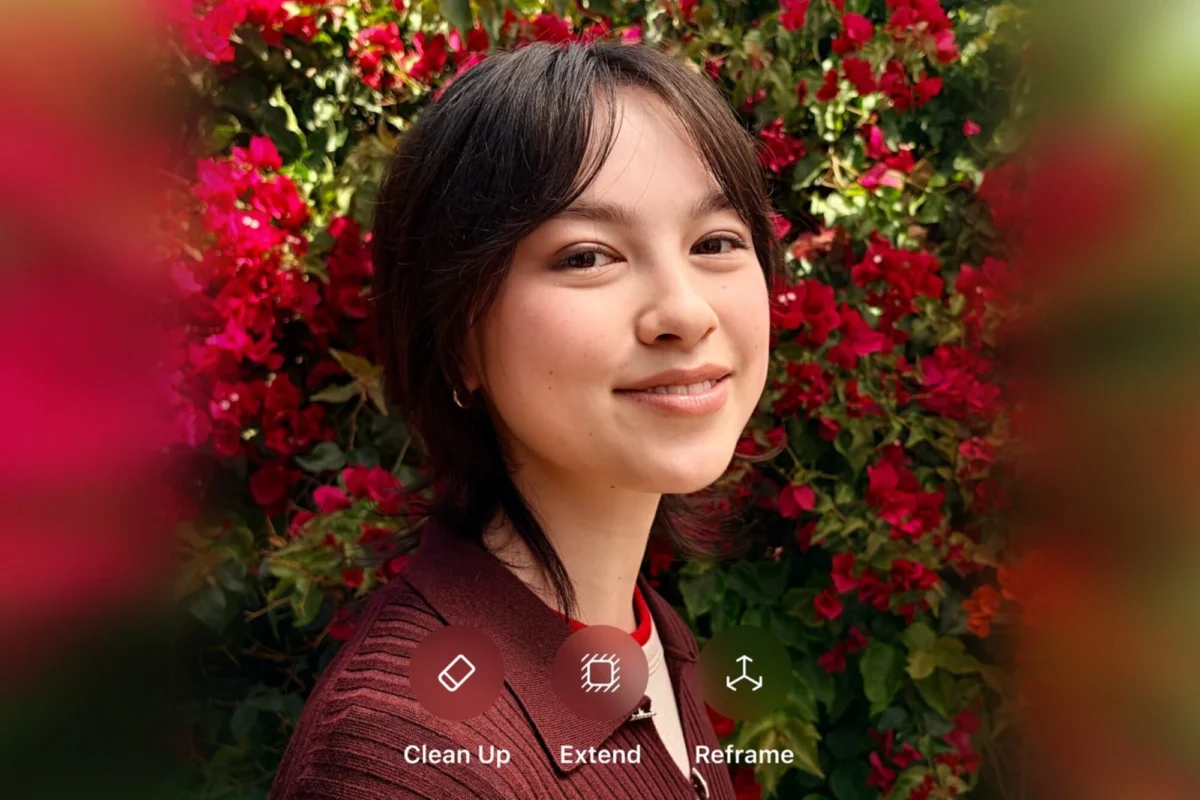
In the realm of media management, macOS 27 introduces "Spatial Reframing," an AI-driven toolset that redefines post-production for standard images. Leveraging the updated Photos app, this feature uses geometric analysis to intelligently adjust the perspective and framing of a shot after it has been captured.

The software uses generative filling to extend the boundaries of photos, a process that relies on a local, on-device model to ensure that the added details remain consistent with the original lighting and texture of the image. This functionality is part of a broader push by Apple to keep high-end creative tools accessible to non-professional users, reducing the reliance on third-party subscription software for basic image manipulation.
Enhancements to Parental Controls and Child Safety
Apple’s commitment to digital well-being has been codified in the new "Family" settings within the macOS 27 System Settings menu. These controls are designed to provide parents with a more transparent view of their children’s digital habits. The introduction of "Ask to Browse" serves as a real-time gateway; when a child attempts to access a website not on the pre-approved list, a notification is sent to the parent’s device, allowing for immediate approval or denial.

Data analytics within the Family portal now show a more detailed breakdown of app usage, categorized by productivity, social media, and gaming. This transparency is intended to facilitate better dialogue between parents and children regarding screen time limits and digital hygiene.
Productivity and Workflow Automation
For power users, macOS 27 addresses the perennial problem of browser clutter with the introduction of automated "Tab Groups." Safari now uses machine learning to suggest groupings based on the user’s browsing patterns, effectively separating research-intensive sessions from casual browsing.

Perhaps more significant for the average user is the "Describe a Shortcut" feature. The Shortcuts app, while immensely powerful, has historically suffered from a steep learning curve. By allowing users to describe their intended automation in natural language—for example, "create a shortcut that resizes all images in my Downloads folder and moves them to my Desktop"—the system generates the complex logic chains automatically. This democratization of automation is expected to significantly increase the adoption rate of Shortcuts among non-technical Mac users.
The Evolution of Maps and Visual Intelligence
The Maps application in macOS 27 has been updated to include "Visual Intelligence," which uses high-resolution aerial imagery combined with advanced rendering models. The result is a highly detailed view of urban environments, where architectural features and natural terrain are rendered with significant precision. This update is part of Apple’s broader effort to compete with the feature-rich mapping solutions currently dominating the market, emphasizing not just navigation, but exploration.

System-Wide Performance and Optimization
Under the hood, macOS 27 focuses on "Liquid Glass" refinements, a set of UI and kernel-level optimizations intended to resolve the intermittent visual glitches that plagued the previous iteration, macOS 26. These updates also include improvements to AirDrop efficiency and file system indexing speeds. Internal benchmarks provided by Apple suggest a 15% increase in file search speeds and a noticeable reduction in latency for high-bandwidth AirDrop transfers, particularly for large video files.
Broader Implications and Market Impact
The release of macOS 27 is more than just a software update; it is an assertion of Apple’s long-term AI strategy. By integrating Google Gemini through a proprietary, privacy-focused compute layer, Apple is positioning itself as a "middle-ground" provider—offering the power of cutting-edge LLMs while maintaining the closed-loop security that has become the brand’s hallmark.

Analysts note that this approach may put pressure on competitors who rely on more open, yet potentially less private, AI integrations. Furthermore, the inclusion of "future updates" such as advanced cross-device file sharing and expanded AR integration suggests that macOS 27 is a foundational release, designed to support the next generation of Apple silicon and wearable devices.
As users begin to upgrade their systems, the true test will be the real-world performance of the Siri AI in diverse, edge-case scenarios. Should the system maintain its speed and privacy promises, macOS 27 may well be remembered as the bridge between the traditional desktop environment and the future of autonomous, agent-based computing. The update is currently available for a wide range of devices, including MacBook Air models from 2022 onwards, the MacBook Pro lineup, and the iMac, with the company encouraging users to verify their system compatibility via the Software Update menu.